
Review:
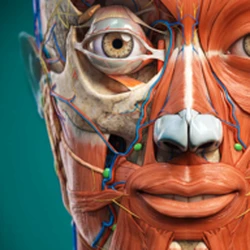
Anatomy Learning - 3D Anatomy is a true 3D anatomy atlas for Android from 3D Medical OU that turns your phone into an interactive model of the human body. Instead of flat diagrams in a textbook, you get detailed 3D models you can rotate to any angle, zoom into, and take apart layer by layer: bones, muscles, ligaments, joints, organs, and blood vessels, all in one app. Medical students use it to revise for exams, teachers use it to show a class how the body fits together, and anyone curious about anatomy uses it to see what a name from a lecture actually looks like.
Also try Yuka.
The version on this page is v4.1.567, and the official package name is com.AnatomyLearning.Anatomy3DViewer3. The app needs Android 12.1 or higher, and the file here is about 87.9MB. This guide covers the genuine Anatomy Learning release: what the app is, what you can study with it, what is free and what the paid content adds, how it compares with other anatomy apps, and safe installation steps for the file.
What is Anatomy Learning - 3D Anatomy?
Anatomy Learning is a 3D atlas of human anatomy built on an interactive 3D touch interface. It is made for medical students, teachers, and anyone interested in medicine, and it covers the whole body in detailed 3D models: the skeletal system, muscles, ligaments and joints, the nervous system, the circulatory system, the digestive system, the respiratory system, and the reproductive system, among others. Each structure is labelled, so you can tap a muscle or a bone and see its name, then keep exploring from there.
The app has been on Google Play since 2014, and it has passed 10 million installs with a 4.5-star rating from around 172,000 ratings. It is a medical education app, not a game, and it is built for study: the models are the point, and everything in the app serves them. You open a body system, pick a structure, rotate it, peel away layers, and read what each part is. It is the closest thing to holding a physical anatomy model in your hand, except it fits in your pocket and costs nothing to download.
One thing to understand before you install it: the app is a study reference, not a doctor. It shows you anatomy in detail, and it is excellent for learning names, positions, and relationships between structures, but it cannot diagnose symptoms or replace a textbook or a teacher. Used the right way, alongside your course materials, it makes the flat diagrams in a book much easier to understand, because you can see how everything sits together in three dimensions.
Anatomy Learning Features:
The heart of the app is the 3D viewer. You can rotate models to any angle and zoom in and out, which matters more than it sounds: a muscle looks completely different from the front than from the side, and being able to turn it over is what makes the anatomy click. Around that viewer, the app adds the tools you need to study properly: layers you can strip away, labels on every structure, and quizzes that test what you just looked at.
Here is what the app does day to day:
- True 3D models of the human body that you can rotate to any angle and zoom in and out with touch controls.
- Detailed models of bones, bony markings, ligaments, joints, cartilage, muscles, organs, and blood vessels, each labelled by name.
- Layered views that let you peel away muscles and other tissues to see what lies underneath, system by system.
- Animations of movements that show how muscles work when the body moves, so you can see function as well as structure.
- Sectional anatomy views for studying cross-sections of the body, which is how anatomy appears on scans.
- Built-in 3D location quizzes to test your knowledge of the structures you just studied.
- Bookmarks to save the structures you need to come back to, for revision or for showing a class.
- Works offline once you have downloaded the content, so you can revise on a bus or in a building with no signal.
- Available in several languages, including Spanish, French, German, Polish, Russian, Portuguese, Chinese, and Japanese.
The app is free to download and carries no ads. The free content covers a solid base of anatomy, and the full library of body systems is available through in-app purchases. Students, teachers, and schools can get free access to the paid content through the developer's education offer, according to recent reviews on the Play Store, so it is worth checking that before you buy anything.
Is Anatomy Learning Free?
Yes, the app is free to download, and the free version is a real study tool, not a demo. You can open the 3D models, rotate and zoom them, explore the free body systems, and use the quizzes without paying anything. The app is supported by ads in the free version.
Some content is paid. The full set of body systems and the complete model library are sold as in-app purchases, priced from $0.99 to $59.99 per item. That range covers single systems at the low end and the full collection at the high end, and prices can vary by storefront, so check the prices inside the app before you buy. Before you pay, check the developer's free access for students, teachers, and schools: recent Play Store reviews say the app offers free access to the paid content for education, and the developer's support team can tell you how to claim it.
For a medical student, the free content is enough to start with, and it is worth using it for a week before deciding whether you need the paid systems. The skeletal system and the free muscles alone cover a large part of a first anatomy course, and the quizzes work on the free content too. If your course moves on to systems that are locked, that is the point to check the education offer or buy the system you need, rather than the whole collection at once.
Also try Calorie Counter by FatSecret.
Anatomy Learning vs Complete Anatomy and Other Anatomy Apps:
Anatomy Learning, Complete Anatomy, and other 3D anatomy apps all solve the same problem in different ways, and the right one depends on what you need: a quick reference, a full course companion, or a professional tool.
Complete Anatomy is the most polished of the three, with a huge model library, lectures, and a very smooth interface, and it is the one many universities standardise on. The trade-off is price: it is a subscription, and the full version costs real money every year. It is also a heavier app, and it expects a newer phone or tablet to run well.
Anatomy Learning is the lighter, cheaper option. The models are detailed and accurate, the quizzes are built in, and the free version is genuinely usable for study. It does not have Complete Anatomy's lecture library or its polish, and some body systems are paid extras, but for a student who needs a reliable 3D reference on a phone, it does the job for far less money, and the education offer can make it free.
Anatomy 3D Atlas, by Catfish Animation Studio, is a different app with a similar name, and it is worth not confusing the two. It is also a 3D anatomy app, with its own model library and its own pricing, and it needs at least 3 GB of RAM and Android 8.0. If you are looking for the 3D Medical OU app on this page, check the package name after installing: it should be com.AnatomyLearning.Anatomy3DViewer3.
In short: pick Anatomy Learning when you want a solid 3D atlas that is free to start with and light on your phone, Complete Anatomy when your university uses it or you want lectures as well as models, and check the developer name before you install anything, because the similar names in this category make it easy to download the wrong app.
Anatomy Learning for PC and Web:
There is no separate "Anatomy Learning for PC" app to download. The app is made for Android and iOS, and the best way to study on a computer is to use the app on a tablet, where the bigger screen makes the 3D models much easier to explore. A phone works well for quick revision, but a tablet is where the app really shines, because you can see the whole model and the labels at the same time.
If you need anatomy on a desktop computer, the developer's website, anatomylearning.com, has information about the app and the education offer, but the 3D viewer itself lives in the mobile app. For a desktop 3D atlas, Complete Anatomy and similar tools have web and desktop versions, though they are paid. For most students, the practical setup is the app on a phone for revision on the move and on a tablet for proper study sessions, with the textbook open next to it.
Also try Gamma.
How to Download and Install Anatomy Learning on Android:
The file on this page is the genuine Anatomy Learning build, version 4.1.567, with the official package name com.AnatomyLearning.Anatomy3DViewer3. Download it over Wi-Fi, then install it with these steps:
1. Tap the download button on this page and wait for the XAPK file to finish downloading. Do not install files named Anatomy Learning from other sites while this one is downloading.
2. Open Settings, then Apps, then Special app access, then Install unknown apps, and allow your browser or file manager to install apps from outside Google Play. Turn this permission off again after installing.
3. An XAPK cannot be installed by tapping it like a normal APK. Open it with an XAPK installer app, which unpacks the bundle and installs the app and its extra files together. If your file manager cannot open XAPK files, install a reputable XAPK installer from Google Play first, then open the downloaded file with it.
4. After installing, open Settings, then Apps, then Anatomy Learning, and confirm the package name is com.AnatomyLearning.Anatomy3DViewer3. If it shows a different package name, uninstall it immediately and download again from this page.
5. Open the app, pick a body system, and download the content for offline use while you have Wi-Fi, so you can revise anywhere later.
Also try Suno AI.
Is Anatomy Learning Safe to Download?
The file on this page is the genuine Anatomy Learning build from 3D Medical OU, version 4.1.567, with the official package name com.AnatomyLearning.Anatomy3DViewer3. After installing, check the package name in Settings, then Apps, then Anatomy Learning. The app itself is free on Google Play, so there is no reason to hunt for a modified copy.
Be careful with copies that promise Anatomy Learning Premium unlocked for free. A "mod" or "full version unlocked" Anatomy Learning APK is not an official build: it is usually an old version with the payment check removed, and it is a common way to spread malware. The official app is free already, and the paid content is sold through 3D Medical OU itself, with free access for students, teachers, and schools, so a mod buys you nothing except risk. Stick to the genuine file on this page, and keep the app updated from a trusted source.
The app downloads its 3D content after installing, so it needs an internet connection the first time you open a body system. Once the content is downloaded, it works offline. That is worth knowing before a flight or a building with poor signal: open the systems you need while you still have Wi-Fi, and they will be there when you need them.
Frequently Asked Questions:
Is Anatomy Learning really free?
The app is free to download, and the free version covers a solid base of anatomy with 3D models and quizzes. The full library of body systems is sold as in-app purchases from $0.99 to $59.99 per item. Students, teachers, and schools can get free access to the paid content through the developer's education offer, so check that before you buy anything.
Is Anatomy Learning good for medical students?
Yes. It is made for medical students and teachers, with detailed 3D models of bones, muscles, organs, and vessels, layered views, movement animations, sectional anatomy, and quizzes on almost every topic. It works best alongside your textbook and lectures, as a visual reference that shows how structures sit together in three dimensions.
Can I use Anatomy Learning offline?
Yes, once the content is downloaded. The app downloads its 3D models the first time you open a body system, so you need Wi-Fi or mobile data for that first load. After that, the downloaded systems work offline, which makes it useful for revision on a bus, on a flight, or in a building with no signal.
Is there an Anatomy Learning app for PC?
No, there is no PC version. Anatomy Learning is made for Android and iOS. On a bigger screen, use the app on a tablet, which shows the models and labels far better than a phone. The developer's website has details about the app and the education offer, but the 3D viewer itself is in the mobile app.
What is the difference between Anatomy Learning and Anatomy 3D Atlas?
They are two different apps with similar names. Anatomy Learning is by 3D Medical OU, with the package name com.AnatomyLearning.Anatomy3DViewer3, and it is the app on this page. Anatomy 3D Atlas is by Catfish Animation Studio, with its own models and pricing. Always check the developer name and the package name after installing, so you know you have the app you wanted.






Leave a Reply
Your email address will not be published. Required fields are marked *