
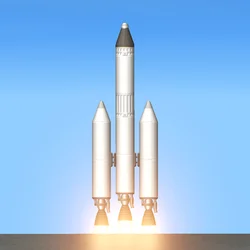
Review:
Have you ever dreamed of building your own rocket and flying it into space? Spaceflight Simulator turns that dream into a game you can play on your phone. You design rockets from individual parts, launch them into orbit, and explore a solar system that is scaled like the real one. It is a mix of creativity and science: you can build anything you imagine, but your rocket still has to obey gravity, thrust, and fuel limits to reach space.
Also try Nerdle.
The game became popular because it does not hold your hand with fixed missions. There is no single correct rocket and no level you must pass. You set your own goals: reach orbit for the first time, land softly on the Moon, recreate a famous SpaceX or NASA launch, or build a giant station in space. Every failed launch teaches you something, and every successful landing feels earned because you designed the machine yourself.
Because the game is so well known, many copycat apps use similar names. Some of them are poor clones with broken physics or heavy ads. This guide explains the real Spaceflight Simulator by Stefo Mai Morojna in simple language. It covers what the game is, how rocket building works, the main features, how to land on the Moon and Mars, how to download and install the APK safely, and answers to frequently asked questions. Game details can change with updates, so it is always smart to check the current version information before installing.
What is Spaceflight Simulator?
Spaceflight Simulator is a 2D space flight simulation game for Android and iOS. You build rockets from parts such as fuel tanks, engines, separators, and capsules, then launch them and fly them yourself. The game uses realistic orbital mechanics, which means your rocket behaves the way a real rocket would: it needs enough thrust to lift off, enough fuel to reach orbit, and a careful burn to slow down for landing.
The game world is an open solar system with realistically scaled planets. You can visit Mercury, Venus, Earth and its Moon, Mars and its moons Phobos and Deimos, and more. If you can see a planet in the distance, you can fly there. There are no invisible walls and no loading screens between planets, which makes every journey feel like one continuous space mission.
Spaceflight Simulator APK Download Latest Version:
The latest version of Spaceflight Simulator available on this page is v1.6.00.22, with a file size of around 102MB. It requires Android 6.0 or higher. The official package name is com.StefMorojna.SpaceflightSimulator, which you can check after installation to confirm you have the genuine app from Stefo Mai Morojna.
Also try Zombie Catchers.
The file is larger than a simple puzzle game because it contains the full physics engine, planet textures, and sound. Make sure you have at least 150MB of free space before installing, and use a stable Wi-Fi connection for the download. Updates usually bring small fixes and improvements, and the latest version fixes a home screen freeze reported by players. Keeping the game updated is a good idea so your rockets and saved worlds keep working smoothly.
How to Build a Rocket in Spaceflight Simulator:
Rocket building is the heart of the game, and it is simpler than it looks. You start in the build menu with a blank rocket. From there you drag parts onto the rocket: a capsule or probe at the top, fuel tanks in the middle, and engines at the bottom. You can stretch tanks to hold more fuel, add side boosters for extra thrust, and use separators to drop empty stages during flight.
A good first rocket is small and simple. Use one capsule, one medium fuel tank, and one engine. This is enough to reach space and practice the controls. Once you can reach orbit with a small rocket, you can scale up: add more stages for Moon missions, landing legs for touchdowns, and solar panels and parachutes for longer flights. The build menu also lets you paint parts and adjust their size, so your rockets can look as good as they fly.
The most common beginner mistake is adding too much weight without enough thrust. If your rocket barely lifts off the pad, add another engine or a side booster, or remove a heavy tank. If it runs out of fuel before reaching orbit, add a bigger tank or a second stage. Testing small changes one at a time is the fastest way to learn what works, and the game lets you rebuild and relaunch in seconds.
Spaceflight Simulator Moon Landing and Mars Missions:
Reaching orbit is only the first step. The real challenge is landing on another world. For a Moon landing, you need a rocket that can leave Earth orbit, travel to the Moon, slow down into lunar orbit, and then descend gently onto the surface. The Moon has no atmosphere, so parachutes will not help you there. You must use your engine to slow down, and you must land upright or your rocket will tip over.
Mars is harder still. It is much farther away, so you need more fuel and a longer journey, and its thin atmosphere only slows you a little. Many players practice on the Moon first, then attempt Mars with a larger multi-stage rocket. Landing on Phobos or Deimos, the small moons of Mars, is a fun middle step because their gravity is very low and landings are more forgiving.
A useful tip is to save your game before a tricky landing attempt. The game lets you quicksave, so if a landing goes wrong you can reload and try again with a different approach speed or a different throttle setting. Watching the speed and altitude readouts during descent is the key skill: slow down early, keep your rocket vertical, and touch down as gently as you can.
Features of Spaceflight Simulator:
Spaceflight Simulator stays focused on one idea — real rocket science made playable — but it packs in a surprising amount of depth. Here are the main features players use most:
Realistic Rocket Physics
The game simulates thrust, weight, drag, and gravity in a realistic way. A heavy rocket needs powerful engines, a tall rocket can wobble if it is unbalanced, and fuel really does run out. This is why the game is popular with space fans: success comes from understanding the physics, not from memorizing a level layout.
Realistically Scaled Solar System
Planets and moons are scaled to feel like the real solar system. Earth is much bigger than the Moon, Mars is a long journey away, and the Sun is a distant, dangerous object you can actually fly toward if you dare. The scale makes distances feel meaningful and every arrival feel like a real achievement.
Open Universe With No Limits
There are no invisible walls in Spaceflight Simulator. If you see something in the distance, you can fly to it. You can leave the solar system entirely, orbit the Sun, or crash into a planet on purpose just to see what happens. This freedom is what keeps players coming back long after their first orbit.
Recreate Real Launches
Many players use the game to recreate famous missions: Apollo Moon landings, SpaceX Falcon landings, and NASA Mars rovers. The part system is flexible enough to build rockets that look like the real ones, and the physics are close enough that the same flight plans often work. There is also an active community that shares rocket designs and tutorials online.
Spaceflight Simulator for PC:
Spaceflight Simulator is made for mobile, but many players also want it on a bigger screen. The official way to play on a PC is through an Android emulator such as BlueStacks or LDPlayer. Install the emulator, sign in with your Google account, and then install the APK file from this page inside the emulator. The game runs well with a mouse and keyboard, and the bigger screen makes rocket building easier because you can see small parts more clearly.
There is also a separate PC version of the game on Steam, but it is a different purchase with its own features. If you only want to try the mobile game on your computer, the emulator route is free and works fine. Save files from the mobile version do not automatically transfer to the Steam version, so keep that in mind before starting a long mission.
How to Download and Install Spaceflight Simulator:
Installing Spaceflight Simulator from an APK file is simple and takes only a few minutes. The file is about 102MB, so a Wi-Fi connection is recommended.
1. Download the Spaceflight Simulator APK file from the download button on this page and wait for the download to finish.
2. Open the phone Settings, go to Security or Apps, and allow Install from Unknown Sources or Allow from this source for the browser or file manager.
3. Open the downloaded APK file from the notifications panel or the Downloads folder.
4. Tap Install and wait for the installation to complete.
5. Open Spaceflight Simulator and build your first small rocket in the build menu.
6. Launch, reach orbit, and check that the game runs smoothly before starting a Moon mission.
If the game is already installed, downloading the latest APK and installing it over the old one updates the game without losing your saved rockets and worlds. After installation, you can turn the unknown-sources permission off again for safety. The package name com.StefMorojna.SpaceflightSimulator confirms you installed the genuine app from Stefo Mai Morojna.
Frequently Asked Questions:
Is Spaceflight Simulator free to play?
Yes. The base game is free to download and play. Some extra parts and expansions are available as in-app purchases, but you can reach orbit, visit the Moon, and land on Mars with the free content. The free version includes the full physics engine and the whole solar system.
Is Spaceflight Simulator safe to install?
The official Spaceflight Simulator app from Stefo Mai Morojna is safe to install. It has millions of downloads and a strong rating from players. To stay safe, download it from a trusted source and check that the package name is com.StefMorojna.SpaceflightSimulator after installing. Avoid copycat apps with similar names from unknown developers.
Can I play Spaceflight Simulator offline?
Yes. The core game works fully offline once it is installed. You can build rockets, launch missions, and explore planets without an internet connection. An internet connection is only needed for downloading the game, updates, and optional community features.
Can I play Spaceflight Simulator on PC?
Yes, through an Android emulator such as BlueStacks or LDPlayer. Install the emulator on your PC, then install the APK file inside it. The game plays well with a mouse and keyboard, and the larger screen makes building detailed rockets easier.
What is the best rocket for beginners?
Start small: one capsule, one medium fuel tank, and one engine. This simple rocket is enough to reach space and learn the flight controls. Once you can reach orbit reliably, add a second stage for Moon missions and landing legs for touchdowns. Small, tested steps beat giant rockets that never leave the pad.
Conclusion:
Spaceflight Simulator is one of the best simulation games on Android for anyone who loves space. Building your own rockets, learning real orbital mechanics by trial and error, and landing on the Moon and Mars with a machine you designed yourself is an experience no other mobile game offers. The open solar system, realistic physics, and freedom to set your own goals give it endless replay value.
The most important step is installing the genuine app. The official Spaceflight Simulator APK with the package name com.StefMorojna.SpaceflightSimulator gives you the true physics, the full solar system, and safe updates. Copycat apps with similar names cannot be trusted to give you the real game. Download the latest version from a trusted source and start your first mission.
If you enjoy simulation and casual games, also check Traffic Rider, Football League 2026, CapCut, and Super Sus.





Leave a Reply
Your email address will not be published. Required fields are marked *