
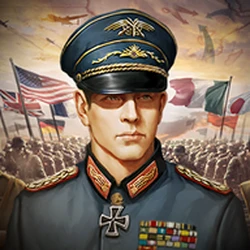
Review:
World Conqueror 3 is a turn-based strategy game about the Second World War and the wars that followed it, made by EasyTech Games. You do not control a single soldier. You control whole armies: you move divisions across a world map, capture cities, manage supplies, and decide where each battle is worth fighting. It is the kind of game that rewards patience and planning over fast reflexes, and it has stayed popular for years because of that — it has passed 10 million installs on Google Play and holds a high rating from hundreds of thousands of players.
Also try The Battle Cats.
The current version on this page is v1.8.16, and the official package name is com.easytech.wc3. The file is about 131MB, and it runs on Android 5.0 and above. The game itself is free to download, with ads and optional in-app purchases inside. This guide covers the genuine EasyTech release: what the game is, how its campaigns and Conquer scenarios work, its generals and units, its best features, safe installation steps, and answers to the questions players ask most. One thing to be clear about from the start: this page offers the genuine game, not a modified copy. Medals and generals in this version are earned by playing, which is how the game is meant to be played.
What is World Conqueror 3?
World Conqueror 3, fully titled World Conqueror 3-WW2 Strategy, is a turn-based military strategy game that first appeared on Google Play in 2015 and is still updated today, with the latest version released in October 2026. You play on real maps of the world, fighting historical campaigns from the Second World War as well as later conflicts. Each turn, you move your units, attack enemy forces, take cities, and build up your economy so your armies can keep fighting.
What makes the game different from a fast action game is that every move counts. A unit that advances too far without support can be cut off. A city taken at the wrong moment can stretch your supply lines. Strong players win by thinking two or three turns ahead, not by tapping faster. That is also why the game suits short sessions: you can play a few turns, put the phone down, and pick the same campaign up later without losing your place.
The game covers around 50 countries and includes 200 famous generals from history, along with 148 military units. Famous commanders have their own skills, so choosing which general leads which army is a real decision, not just decoration. A general who is good at defence suits a holding force, while an attacking general belongs at the front of an advance.
World Conqueror 3 APK Download Latest Version:
The latest version on this page is v1.8.16, the full Android release of the official EasyTech game. It is free to download, and the genuine build carries the package name com.easytech.wc3. Before installing any copy from anywhere else, check that package name: anything with a different package name is a different file using a similar name, not the official EasyTech release.
At about 131MB, the file is a medium-sized download. It downloads comfortably on Wi-Fi, and on mobile data it takes a few minutes depending on your connection. Make sure your phone runs Android 5.0 or newer before installing, and leave a little extra free space beyond the file size for the game's saved data.
World Conqueror 3 Campaigns and Conquer Scenarios:
The heart of the game is its campaigns. There are more than 30 historical campaigns to work through, each built around real battles and real maps. Campaign missions give you a set objective, a set force, and a limited number of turns, so each one feels like a puzzle as much as a battle. Clearing a campaign unlocks the next, and later missions expect you to use everything you learned earlier.
Alongside the campaigns, the game has its Conquer mode, which is where many players spend most of their time. Conquer mode lets you take control of a whole country and fight for the world, across four scenarios: Conquer 1939, Conquer 1943, Conquer 1950, and Conquer 1960. Each scenario starts from a different point in history, with different borders, different alliances, and different technology available. A 1939 start plays very differently from a 1960 start, so the mode stays fresh long after the campaigns are finished.
Also try Kingdoms & Lords.
Conquer mode is also where your long-term decisions matter most. You recruit generals, upgrade units, build wonders, and manage the cities you capture. A quick early victory can still turn into a slow defeat if your economy cannot support the army you built, which is exactly the kind of problem strategy players enjoy solving.
Generals, Units and How Battles Work:
Battles in World Conqueror 3 are fought by units on a grid-based map. Infantry, tanks, artillery, aircraft, and naval units each have a job, and each is weak against something else. Tanks break through lines but struggle in rough ground. Artillery hits hard from a distance but needs protection. Aircraft can strike deep into enemy territory but cannot hold a city on their own. Learning these strengths and weaknesses is the core skill of the game.
Generals sit on top of that system. The game includes 200 famous generals, each with skills that change how their army performs. Some improve attack, some improve defence, and some help with movement or supply. You earn medals by playing, and you spend those medals to recruit generals and improve them. It takes time to build a strong roster, but that slow progress is part of the appeal: a general you worked for feels different from one handed to you at the start.
Cities matter as much as armies. Capturing a city gives you resources and a base to build from, and losing one can cut your income in half. Smart players defend their key cities, use terrain to slow the enemy, and only attack when they have the units and the supplies to finish the job. Rushing in without a plan is the fastest way to lose a campaign.
Features of World Conqueror 3:
World Conqueror 3 packs a large strategy game into a phone-sized package. Here are the features that matter most:
- Turn-based WWII strategy on real world maps, with more than 30 historical campaigns to complete.
- Conquer mode with four scenarios: Conquer 1939, Conquer 1943, Conquer 1950, and Conquer 1960.
- 200 famous generals with their own skills, recruited and upgraded with medals earned by playing.
- 148 military units across land, air, and sea, from infantry and tanks to aircraft and warships.
- Around 50 playable countries, each with its own starting position and strategic problems.
- City building, wonders, and resource management that decide whether an army can keep fighting.
- Three difficulty levels, so new players can learn the systems and experienced players can face a real challenge.
- Offline-friendly campaign play, so you can take a few turns anywhere without needing a constant connection.
World Conqueror 3 for Android: How to Download and Install:
Installing the game from this page takes only a few minutes. Follow these steps in order, and do not skip the security check in step four.
1. Tap the download button on this page to get the World Conqueror 3 APK file. The file is about 131MB, so Wi-Fi is the sensible choice if you have it.
2. Open Settings, then Security, and allow installation from unknown sources for your browser or file manager. On newer Android versions, this permission is granted per app, so allow it only for the app you are installing from.
3. Open your Downloads folder, tap the APK file, and follow the on-screen prompts to install it. If Android warns you about the file, check that it is the 131MB file from this page before continuing.
4. After installing, open Settings, then Apps, then World Conqueror 3, and confirm the package name is com.easytech.wc3. If it shows a different package name, uninstall it immediately and download again from this page.
5. Open the game, work through the opening missions to learn the controls, and then choose between the historical campaigns and Conquer mode. Start on an easier difficulty if you are new to the series, and save your medals for generals that fit the way you like to play.
Also try Spaceflight Simulator.
World Conqueror 3 vs World Conqueror 4:
Players often ask whether they should play World Conqueror 3 or World Conqueror 4. The simple answer is that they are separate games from the same developer, not two versions of the same game. World Conqueror 4 is the newer sequel, with its own campaigns, generals, and systems, while World Conqueror 3 is the earlier game that many long-time players still prefer for its campaigns and its Conquer scenarios.
If you are new to the series, World Conqueror 3 is a good place to start. It is a complete game with years of updates behind it, it runs on older phones, and its systems are easier to learn than the sequel's. If you finish its campaigns and want more, World Conqueror 4 is the natural next step. Progress does not carry over between the two games, so treat each one as its own campaign to complete.
Frequently Asked Questions:
Is World Conqueror 3 free to download?
Yes. World Conqueror 3 is free to download and play. It contains ads and offers optional in-app purchases, such as extra medals, but the campaigns and Conquer mode can be played without paying.
Does this version have unlimited medals?
No. This page offers the genuine EasyTech release, so medals are earned by playing campaigns and Conquer scenarios. Modified copies that promise unlimited medals are re-signed by other people, not by EasyTech, and they cannot be installed over the official game. If you want a safe, updatable copy, use the genuine version on this page.
Can I play World Conqueror 3 offline?
The campaigns and Conquer mode are designed to be played in turns at your own pace, and they do not need a constant connection for single-player play. Some features, such as ads and purchases, do need the internet, so a connection is still useful from time to time.
Which Android version do I need for World Conqueror 3?
The current version needs Android 5.0 or newer. The file is about 131MB, so leave some extra free space for saved games and updates as you work through the campaigns.
Can I play World Conqueror 3 on PC?
World Conqueror 3 is an Android game, so there is no official PC version. You can still play the Android version on a PC by running it inside an Android emulator such as BlueStacks, using the APK file from this page. Progress made in an emulator stays in that emulator unless you use the same account or save method.
Also try BusGOGOGO.




Leave a Reply
Your email address will not be published. Required fields are marked *